
Rapid Assessment
A Rapid Assessment is the lightweight inspection workflow for a quick site visit. Capture up to five images, let Bee analyse the visible issues, and keep the essential findings and follow-up scope together without setting up a full tender package.
When to Use Rapid
Choose Rapid when:
- You need a fast visual record from a site visit.
- The evidence can be represented by up to five photos.
- You want AI analysis and a focused follow-up scope.
- You do not need tender-document extraction, a full drawing take-off or a large priced hierarchy yet.
Use Damage Assessment for an insurance-style damage investigation with locations, pinned findings, onset and authenticity review. Use General Work Assessment for broader maintenance or renovation scoping. Use Tender Assessment for BOQs, drawings, specifications and detailed procurement pricing.
Create a Rapid Assessment
Open + New → New Assessment, enter a name and select the Rapid card.
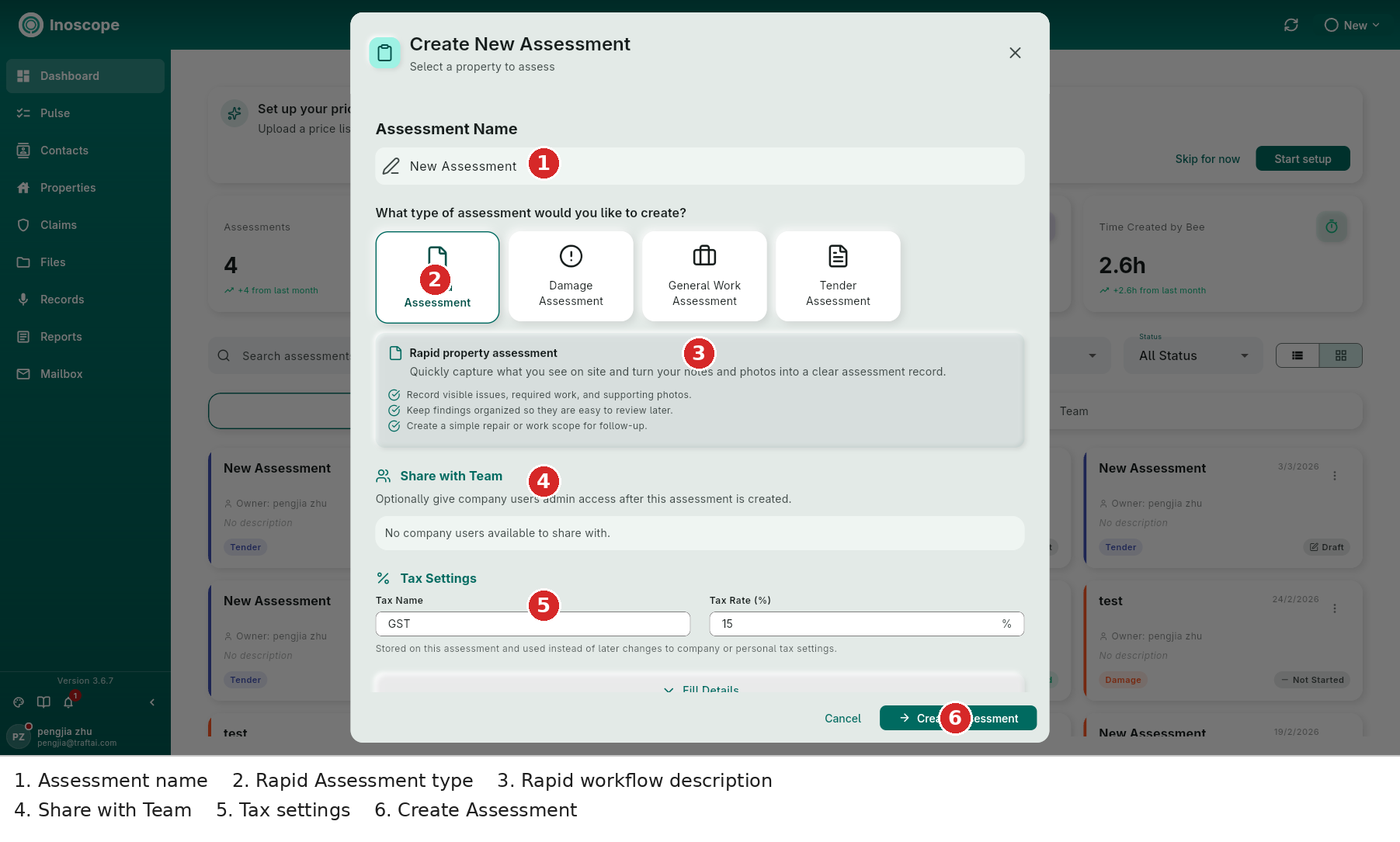
- Assessment Name — use a property or job name that will be easy to find later.
- Rapid Assessment — select the Rapid type card. The description explains that the workflow combines a small amount of visual evidence with quick AI analysis and follow-up scope.
- Share with Team — give team members access during creation when the inspection is collaborative.
- Tax Settings — set the tax name and rate for any costed follow-up work.
- Fill Details — add an assessment description and property details. Rapid still requires a meaningful property/job context even though its evidence set is small.
- Select Create Assessment.
Add the Inspection Images
The new Rapid assessment opens to a dedicated upload state rather than the full tender tab workspace.
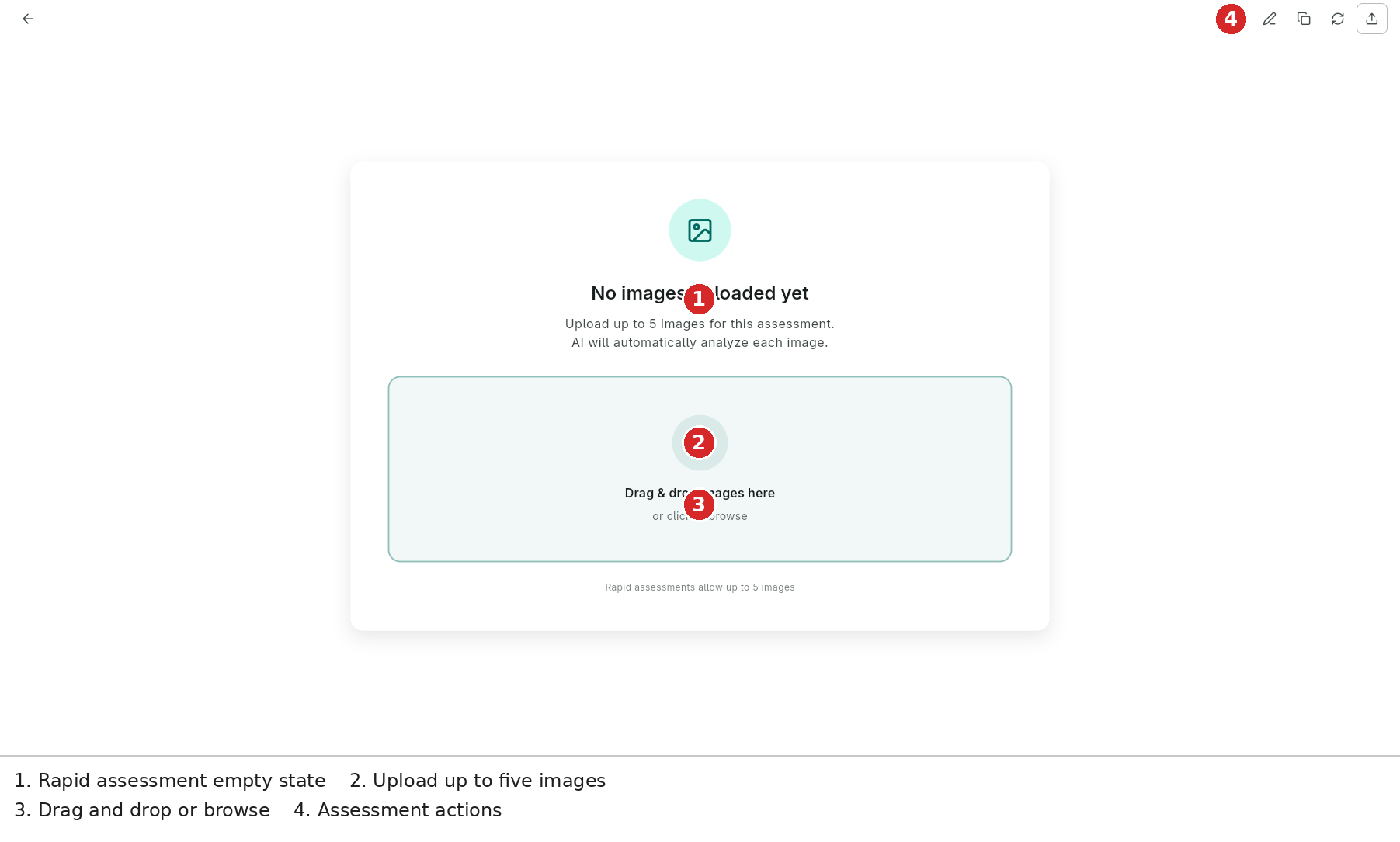
- Upload limit — add up to five images to the Rapid assessment.
- Drop zone — drag images into the panel, or select Browse to choose them from the device.
- AI analysis — after upload, Bee analyses the images and extracts the visible issues and relevant observations.
- Assessment actions — use the header actions to edit the assessment, manage files, refresh processing, create a snapshot or share the assessment.
Keep the clearest establishing shot and use the remaining images for close-ups of defects, materials, access constraints or other evidence that affects the follow-up work.
Review the Result
After the images finish processing:
- Read the generated observations and check them against the photos.
- Correct anything that is incomplete or too broad through Bee.
- Add a voice note or supporting file from Records or Files when the visual evidence needs context.
- If the work has become a larger repair investigation, continue in a Damage or General assessment instead of forcing the Rapid workflow to contain a full evidence set.
- Save a snapshot before substantial changes.
Rapid is intended to get the essential facts down quickly. The shared Line Items & Costing and Reports workflows can be used when the resulting scope needs pricing or a formal deliverable.
Rapid Versus Other Assessment Types
| Need | Use |
|---|---|
| Up to five photos and a fast first-pass scope | Rapid Assessment |
| Pinned damage, authenticity, onset, severity and repair scope | Damage Assessment |
| Maintenance or renovation work without damage classification | General Work Assessment |
| Tender package, drawing take-off, priced hierarchy and quote workflow | Tender Assessment |