
Subscription & Billing
Billing lives under Settings → Payments: your active plans, anything needing attention, saved payment methods, and 24 months of invoices.
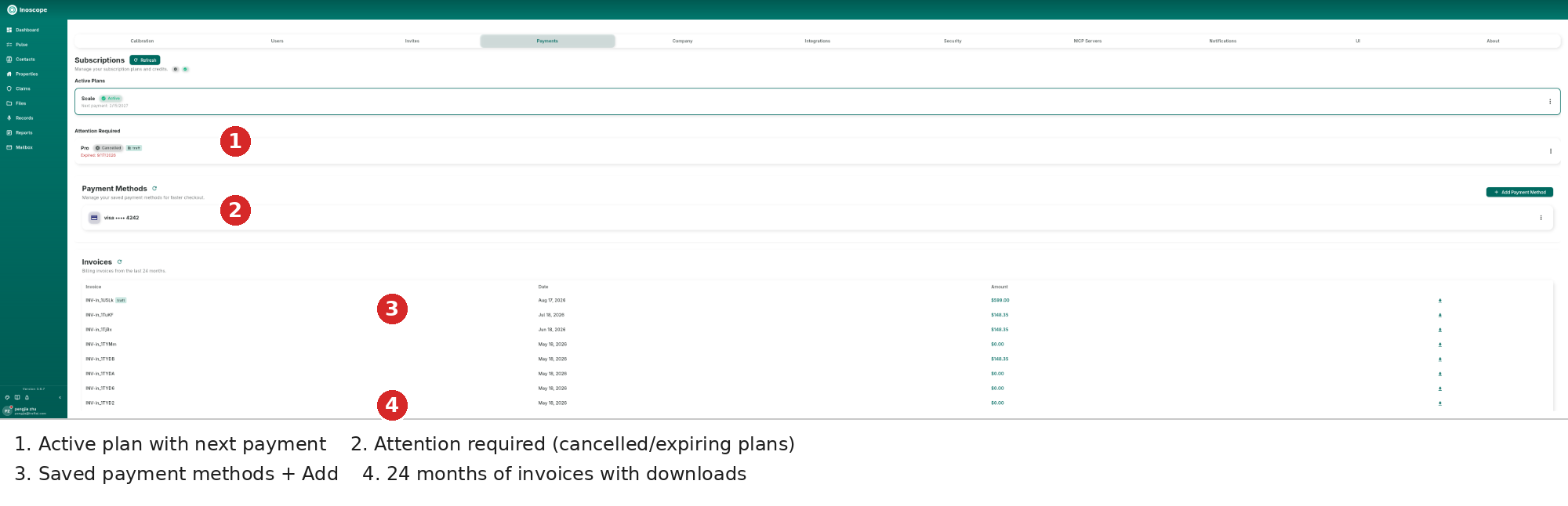
- Active Plans — the current plan (e.g. Scale, Active) with its next payment date; the ⋮ menu manages the subscription. The header shows your credit balance and a Refresh.
- Attention Required — cancelled or expiring plans (e.g. Pro, Cancelled/Test) with the expiry date in red; act before access lapses.
- Payment Methods — saved cards (e.g. visa •••• 4242) for faster checkout; Add Payment Method stores another.
- Invoices — billing invoices from the last 24 months with invoice number, date and amount; the download icon fetches the PDF.
Managing Plans
- Upgrade / downgrade from the plan card menu; changes prorate against the next payment.
- Cancel any time — the plan stays active until the paid period ends and then appears under Attention Required as Cancelled.
- Test plans are labelled Test so real and sandbox billing never mix.
Credits
The dots next to Refresh show prepaid credits; usage draws down credits before card charges where your plan allows.